
Last month, two store operators tried the same support-automation tool. Three hours in, the first wrote: "This thing is garbage. Nothing works." The second runs a similar store and used the same product; setup took her about 40 minutes, and she says it now saves a day of work each week.
Both accounts can be true. The difference wasn't intelligence or even the product. One operator had never written a structured prompt or worked with support macros; the other manages a support inbox every day and had already used chat AI for a year. Same tool, very different starting point.
That gap is why we built the difficulty card. I designed the level system at EcomAgentTools, and this article explains what each field means and how to use it before spending money or connecting store data.
Why we divide users into levels at all
When we started cataloguing ecommerce AI tools, "Is this tool good?" turned out to be the wrong buying question. A better one was: "Does it fit this operator, right now?"
The most common failure mode in AI adoption is not bad model output. It is mismatch:
- A beginner buys a platform that assumes they can design multi-step automations. Two weeks later it is an abandoned subscription.
- An experienced operator picks a toy guided tool and concludes "AI is overhyped" because it cannot touch their real workflow.
- Worst case: someone connects a tool with write access to their store before they can evaluate what it is doing, and spends a weekend undoing price or inventory changes.
An "easy / medium / hard" badge can't explain these failures because difficulty has more than one source. A copy-paste prompt feels obvious to someone who uses ChatGPT every day and completely unfamiliar to someone writing a first prompt. An inventory forecast may be routine for a multi-store operator and baffling to a first-time seller, even with a polished interface.
So we split "difficulty" into the two kinds of experience a task actually demands — AI familiarity and store operations experience — and rate every tool, skill, and prompt on both. The overall level you see on the card comes from those two scores.
The important distinction is this: level is not a quality grade. Level 1 doesn't mean bad, and Level 5 doesn't mean good. Some of the highest-rated resources in our catalogue are Level 1. Treat the number like a shoe size. Bigger is not better; the right fit is better.
What every field on the card means
Here is what each field tells an operator.
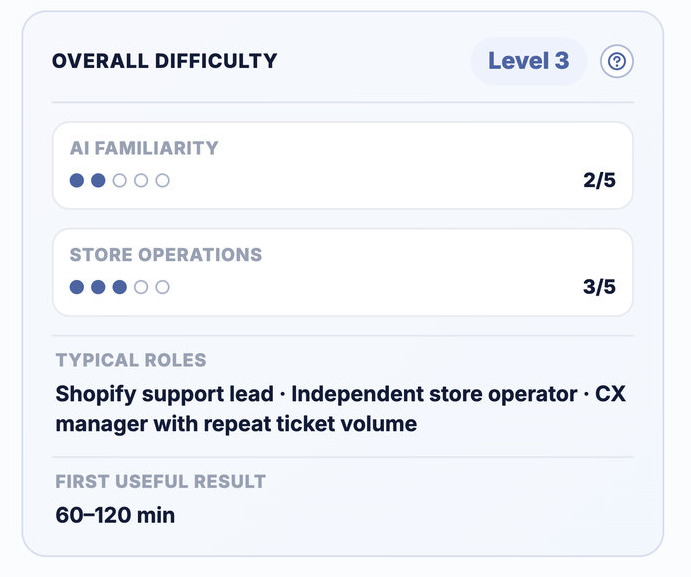
Overall difficulty: Level 1–5
This is the headline number. We calculate it conservatively: the overall level equals the higher of the two dimension scores. If a tool needs AI familiarity 2 and store operations 4, it is Level 4. The hardest prerequisite sets the level. A simple interface cannot replace the store judgment needed to approve a refund or inventory change, just as years of retail experience cannot replace prompt or API skills when the setup genuinely needs them.
The five levels:
| Level | Name | What it represents |
|---|---|---|
| 1 | Guided Starter | The easiest level. A guided interface and basic web skills are enough; no previous AI or store-operations experience is expected. |
| 2 | Task Operator | A focused ecommerce task with simple inputs and manual review. Basic AI use and store workflow knowledge are enough. |
| 3 | Independent Store Operator | Requires independent store judgment, repeatable operating processes, and the ability to validate results against business metrics. |
| 4 | Automation Lead | Requires multi-step automation design, permission control, monitoring, and a rollback plan across connected store systems. |
| 5 | Commerce AI Architect | The most demanding level. Code, APIs, or self-hosting are usually involved, together with security and governance decisions. |
AI familiarity (x/5)
How much hands-on AI experience the resource assumes. Each point:
- 1/5 — No AI experience needed. You follow a guided interface and review the draft.
- 2/5 — You can use chat-style AI tools, give clear task instructions, and check the result before using it.
- 3/5 — You can structure prompts with examples and constraints, and troubleshoot inconsistent output.
- 4/5 — You can design multi-step AI workflows, connect tools, and monitor quality and permissions.
- 5/5 — You can work with APIs or code, evaluate models, and govern complex AI systems.
Store operations (y/5)
How much ecommerce operating experience the resource assumes, independent of AI:
- 1/5 — No operations experience required beyond knowing the product or task you want to complete.
- 2/5 — You understand basic product, order, or customer workflows and can complete one focused task with guidance.
- 3/5 — You can run daily store operations independently, judge business impact, and validate results against metrics.
- 4/5 — You can coordinate workflows across teams and systems, define controls, and manage rollback plans.
- 5/5 — You can architect and govern operations across multiple stores, markets, systems, and data sources.
Typical roles
These are examples of people who can use the resource successfully, not job-title requirements. If the roles resemble your work—or the role you are hiring for—the fit is promising. If the card describes expertise nobody on the team has, find that out before buying.
First useful result
A realistic range from signing up to producing one useful result. It includes reading the documentation and running a safe test, not just reaching the first dashboard a marketing page calls "up and running."
The range comes from the resource's setup mode. A UI-based tool typically lands at 20–45 minutes, a copy-paste prompt at 15–35, a no-code automation at 45–90, an API integration at 90–180, anything involving code at 90–240, and self-hosted setups at three hours and up. Higher overall levels add time on top, because validation takes longer when the stakes are higher.
What sits behind the card
Below each resource you will also find a level-aware guide: what to prepare before you start, an operator-ready setup plan with checkpoints, how to test safely, known limits, data sensitivity, and whether the tool can write to your store (content, prices, inventory, orders, refunds, ads) — plus whether we recommend mandatory human approval for its output. The card is the summary; that guide is the working document.
How to use the levels before you commit to a tool
The card only works if you score your own experience honestly. Use three steps:
Step 1 — Score yourself on both dimensions. Use the definitions above. Quick self-test: if you can write a prompt with examples and constraints and debug inconsistent output, you are an AI-familiarity 3. If you can run daily store operations alone and judge results by metrics, you are a store-operations 3. Score what you can do today, not what you plan to learn by Friday.
Step 2 — Compare against the card.
- Both your scores meet or beat the card: green light. Expect the stated time-to-first-result.
- One score is short by a single point: doable, but plan for it — use test data, a small batch, or a colleague who covers that gap for the first run.
- Either score is short by two or more: do not buy yet. Pick a lower-level resource in the same category and come back.
Step 3 — Plan the first session from the time estimate. Block the full "first useful result" window on your calendar, run it against a test product or a small sample, and keep a rollback note. If the card says 60–120 minutes and you give it fifteen, you have not evaluated the tool — you have evaluated your own patience.
Move up one step at a time. A Level 2 operator who successfully runs five Level 2 workflows will usually reach Level 3 faster than someone who buys a Level 4 platform and fights it for a month. Use the levels to order the learning, not to keep people out.
The three mistakes I see most: treating the level as a quality score (it is not), ignoring your weaker dimension (the overall level is set by exactly that one), and buying for the operator you wish you had instead of the one you have.
How we assign the levels
Every resource starts with a category default, then we adjust it using the difficulty metadata and manual review. A verification date means a person last checked the resource against its source on that date. The system is not finished. We revise cards as usage evidence arrives, and comments that explain where a level felt wrong are useful inputs for the next review.
The level describes the work required from your team; it doesn't pass judgment on the tool. Quality is handled separately in our tool and skill scoring methodology. Read both before you subscribe.
Comments
Share experience or ask a question. Comments are plain text; any external link is automatically marked nofollow.
No comments yet.