

Replenishment forecasting is not simply guessing next month's sales. It turns demand, inventory, lead time, and purchasing constraints into two decisions: when to reorder and how much to order.
1. What is replenishment forecasting, and what is its overall objective?
Replenishment forecasting is not a table of future sales. It is a purchasing decision process:
Estimate the demand a SKU may face before replenishment arrives and before the next review, then combine that estimate with current sellable inventory, dependable incoming supply within the protection period, safety stock, supplier lead time, MOQ, case packs, and cash limits to decide when to order, how much to order, and who approves the PO.
It must answer at least two different questions:
- When to reorder: when is inventory close enough to risk that someone must review or place an order?
- How much to order: what quantity covers demand without buying too much after MOQ, case-pack, cash, and storage constraints are applied?
A demand forecast only answers “how much might sell?” It is one input. The reorder point turns that input into a trigger, while the order-quantity calculation turns the trigger into a PO that has been constrained and approved by a named person.
Oracle's reorder-point documentation gives the basic trigger relationship:
reorder point = forecast demand during replenishment lead time + safety stock
That formula answers when action is required, not the final quantity to buy. A small seller can begin with this auditable order check:
suggested order quantity = max(0, demand across the target protection period + safety stock − current sellable inventory − dependable incoming supply available within that period)
The protection period must cover the full time from PO approval until goods are sellable. A weekly review also needs to cover exposure before the next review. The result is still only a suggestion: round or cap it for MOQ, case packs, budget, storage, and supplier order days, then send it to the accountable approver.
The objective is not 100% accuracy or permanent availability
Replenishment forecasting is not meant to:
- make forecast accuracy reach 100%;
- buy unlimited safety stock to eliminate every stockout;
- keep the largest possible quantity of every SKU on hand.
Its real objective is:
Meet demand at an acceptable stockout risk or service level, using a reasonable inventory and cash investment while controlling purchasing, carrying, ordering, and stockout costs.
OpenStax's inventory-management text separates purchasing, carrying, ordering, and stockout costs. MIT supply-chain course material explains that safety stock covers uncertainty during lead time and review periods in support of a defined service target. Higher service generally requires more inventory; both too little and too much stock have a cost.
| When inventory is too low, a seller may face | When inventory is too high, a seller may face |
|---|---|
| A fast seller runs out before the next receipt, losing sales that could have been filled | Slow stock absorbs cash that cannot be used to replenish the SKUs actually selling |
| Paid traffic reaches a product that is unavailable | Storage, insurance, shrinkage, and handling costs continue to accumulate |
| Split shipments, emergency buying, or expedited freight | Seasonal, obsolete, or repackaged goods require markdowns |
| Late ordering disrupts fulfillment and receipt plans | Early or excessive buying restricts the next PO |
Getting it right changes more than an accuracy score
An executable replenishment process is more likely to help a team:
- see stockout and overstock risk before the problem arrives;
- align PO dates with full supplier lead time rather than a remembered promise;
- keep sellable, committed, unavailable, and incoming stock distinct;
- allocate limited cash to the SKUs that matter first;
- preserve the suggestion, approved quantity, and override reason so a later review can explain why the team bought too much or too little.
Doing nothing is still a forecast
Ordering by feel, copying the last PO, or waiting until stock looks low all make assumptions about future demand. The difference is that an implicit rule often leaves daily sales and lead-time assumptions unwritten, mixes normal sales with promotions and stockouts, records no error, and gives no signal when supplier conditions, cash, or inventory states change.
Professional replenishment forecasting does not make a simple judgment look complicated. It makes assumptions visible, errors reviewable, and each PO traceable to a calculation and an approver. These are operating mechanisms, not universal ROI claims; there is no trustworthy basis for promising every seller the same revenue uplift.
2. Why is “10 units a day × three days = reorder at 30” not enough?
Direct answer: the rule is valid. If demand is a steady 10 units a day, full lead time is always three days, inventory is observed continuously, there is no reliable incoming supply, safety stock is zero, and no MOQ or cash constraint applies, then:
basic reorder point = 10 × 3 = 30 units
That is already the simplest deterministic replenishment forecast. A professional method does not discard it. It keeps testing the assumptions behind it and separates the trigger from the final order quantity.
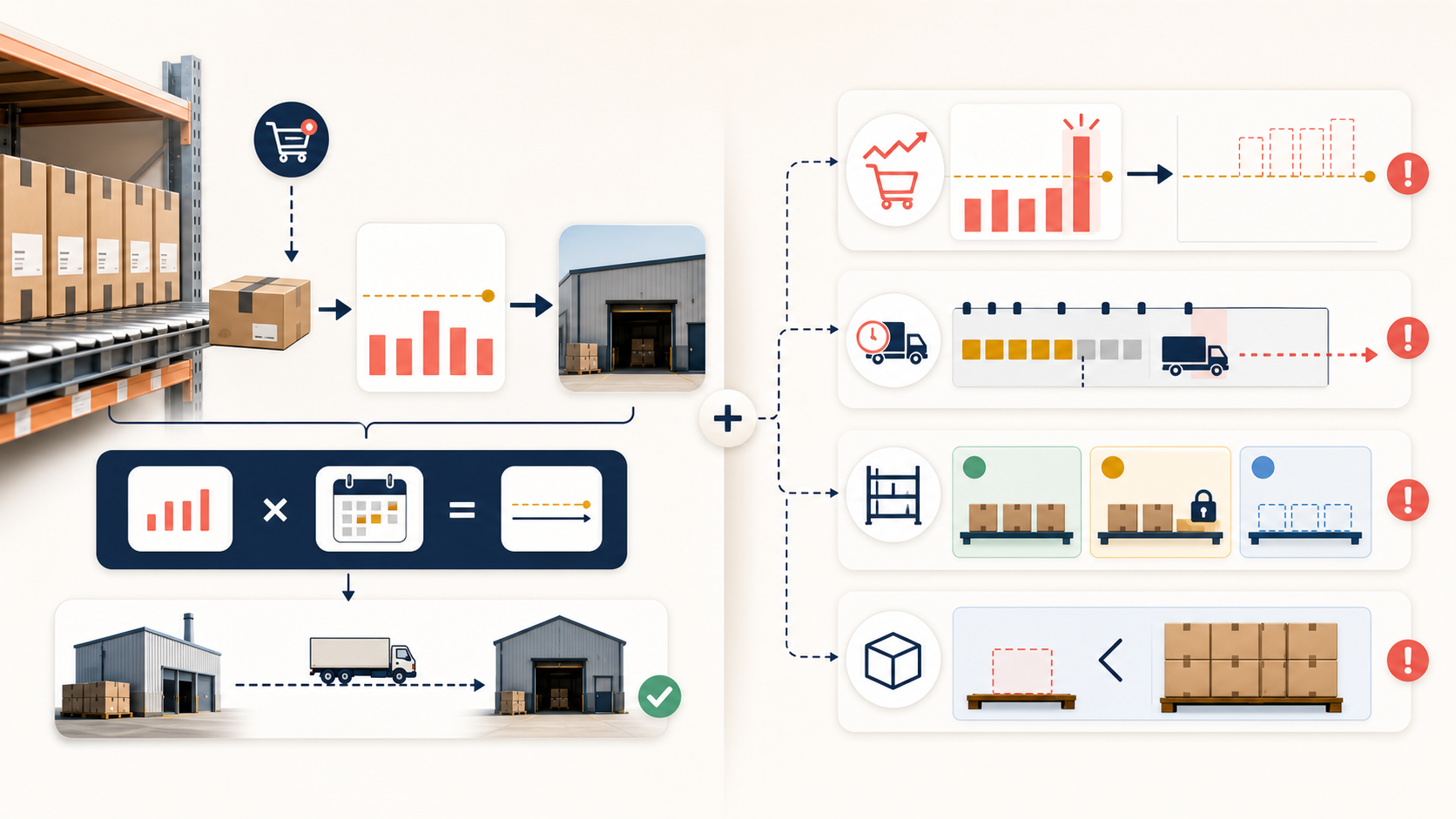
The 30-unit rule only remains complete while demand stays stable, full lead time is always three days, inventory is observed continuously, the stock number has one unambiguous meaning, sales history is not depressed by stockouts, and MOQ, case packs, cash, and storage do not constrain the purchase. Change one assumption and either the trigger or the order quantity changes with it.
First, daily sales are not a constant
An average of 10 units a day does not mean the next three days will each sell 10. Trend, promotions, seasonality, launches, price changes, and advertising can alter the immediate demand. If the next three days require 8, 13, and 22 units, a 30-unit buffer does not cover the resulting 43 units.
Safety stock absorbs demand and lead-time variation, but it is not a universal percentage added by habit. MIT course material ties the buffer to uncertainty across lead time and the review period, as well as the service target the business chooses.
Second, “three days from the supplier” may not mean sellable in three days
Full lead time runs from PO approval until the product can actually be sold. It may include production or picking, inspection, domestic and international freight, customs, warehouse receipt, quality checks, and putaway. Recording only the supplier's quoted production time makes the trigger systematically late.
Review frequency also changes the protection period. If inventory is checked every Monday and a SKU crosses its threshold on Tuesday, the risk may remain unseen until the following Monday. The protection period therefore covers lead time plus exposure before the next review.
Third, “30 in stock” may not mean 30 sellable units
Shopify's inventory-state documentation defines on hand as including committed, unavailable, and available, while incoming is separate and cannot be sold until received. A replenishment calculation needs a named source of truth for each state and should count only incoming supply expected to become sellable within the protection period.
If the calculation already starts from available inventory, do not subtract committed inventory again. Conversely, do not treat all incoming supply as stock available today; a delayed PO can otherwise hide the need to reorder.
Fourth, units sold do not always equal the demand customers had
During a stockout, the store records completed sales but cannot observe every purchase that did not happen. Feeding a stockout week's low units into the next calculation can bias demand downward. Research on lost sales supports this mechanism, not a small-business forecast-accuracy benchmark.
The spreadsheet or software should at least flag stockouts, listing pauses, and abnormal availability. Those periods can be excluded, estimated separately, or treated as low-confidence data, but they should not pass as ordinary low-demand weeks.
Fifth, 30 units says when to trigger, not how much to buy
The threshold may say to reorder at 30 units while the supplier requires an MOQ of 100 or a case pack of 24. The team still has to choose 100 versus 200, estimate how long it will last, check cash and storage, and account for any dependable PO already in transit.
Professional replenishment forecasting therefore does not reject “10 × 3 = 30.” It:
Keeps daily demand, full lead time, safety buffers, and inventory definitions current, while calculating “when to reorder” separately from “how much to order.”
3. How should a seller forecast replenishment professionally?
Professional does not mean buying software first. The minimum standard is consistent input definitions, a calculation another person can reproduce, documented overrides, accountable PO approval, and results that can be reviewed. The sections below cover the manual method, software implementation, tool choices, and upgrade trigger.
3.1 How can a seller begin without software?
Direct answer: build a spreadsheet process another person can recalculate, with explainable overrides, a named approver, and results that can be reviewed later. That is already professional replenishment forecasting; expensive software is not a prerequisite.

Step 1: build a reviewable demand ledger in SKU units
Replenishment decisions concern how many units of a SKU to buy, not total-store revenue. Price, discount, and bundle changes can move revenue without changing required units in the same proportion.
Begin with the priority SKUs where a buying mistake would materially affect availability or cash. A small seller does not need to model every long-tail item on day one. Keep at least these fields for each selected SKU:
| Field | Minimum requirement |
|---|---|
| SKU and location | Identifies the item and stock point actually being replenished |
| Weekly units sold | Uses SKU units, not total-store revenue |
| Exception flags | Stockout, promotion, price change, launch, listing pause, or unusual order |
| Current sellable inventory | What can actually be sold now |
| Reliable incoming supply | Quantity, expected sellable date, and PO status |
| Full lead time | Approval to the point at which the product becomes sellable |
| Purchasing constraints | MOQ, case pack, order day, payment term, space, and cash cap |
| Accountability | Suggested quantity, approved quantity, approver, and reason for the change |
Add flags for stockouts, promotions, price changes, launches, unusual orders, delayed receipts, and listing problems. With limited history, label the output a planning assumption or a range rather than a high-confidence point forecast. Shopify's forecasting guide treats eight weeks of consistent orders as a point at which forecasting can begin and one year as necessary for seasonality. Those are platform starting points, not accuracy guarantees.
Step 2: establish a simple baseline for stable SKUs
A stable item can begin with a moving average of the last four to eight comparable weeks. For four weeks:
weekly baseline = units sold in four comparable weeks ÷ 4
Do not silently mix promotions, stockouts, or unusual bulk orders into the average. Flag them, then decide whether to exclude them, substitute another period, or add a documented override. A clear, reproducible baseline is the comparison point; model complexity is not the starting goal.
Step 3: calculate when action is required
Write down full lead time, review frequency, and the reason for the safety stock, then calculate:
reorder point = expected demand during full lead time + safety stock
Do not give every SKU an arbitrary “20% extra.” The buffer should at least reflect demand variation, lead-time variation, the cost of a stockout, replenishment difficulty, review frequency, and the stockout risk the business will accept. A written reason makes the buffer reviewable later.
Step 4: calculate the suggested purchase quantity separately
After the reorder point is reached, calculate:
suggested order quantity = max(0, demand across the target protection period + safety stock − current sellable inventory − dependable incoming supply available within that period)
Then round or reduce it for MOQ, case packs, the cash cap, storage, and supplier order days. The reorder point and order quantity are both measured in units, but the first is a trigger and the second is a purchase suggestion. A suggestion is still not an approved PO.
Step 5: hold one fixed 30-minute replenishment review each week
Review each priority SKU:
- How many units sold last week, and was there a stockout, promotion, or unusual order?
- What is currently sellable, committed, unavailable, and incoming?
- Which known events or risks affect the next 4–8 weeks?
- Did full lead time, expected receipt, MOQ, or payment terms change?
- What quantity does the spreadsheet suggest?
- Is the decision approve, hold, or investigate?
Step 6: record every override and approver
For example, the sheet suggests 120 units and the owner approves 80 because the packaging changes next month. Store the suggestion, approved quantity, approver, and that sentence together. At the next review, the team can tell whether the override improved the result or damaged a sound recommendation.
Step 7: review both forecast error and operating outcomes
Start with a simple error measure:
absolute error = |forecast units − actual units|
Then ask whether the miss actually changed a PO, transfer, or promotion decision. Did an avoidable stockout occur? Did weeks of supply stay too high? Did the team expedite repeatedly, or approve too late? If the error changed no operating decision, chasing a smaller number may have little value.
Change one input at a time, such as a promotion adjustment, full lead time, or SKU group. Then the next result can show what made a difference. The professional core is consistent definitions, visible assumptions, reproducible calculations, named approval, and reviewable results.
3.2 How should a seller use software?
Software should take over repetitive work: syncing orders and inventory, calculating in batches, surfacing exceptions, drafting POs, and preserving approvals. It should not quietly decide how the owner spends cash.
Use this sequence during a trial:
- Clean the inputs. Verify how products, locations, cancellations, bundles, returns, stock states, and incoming POs enter the calculation.
- Configure constraints. Set full lead time, MOQ, case pack, service target, and review frequency by SKU or supplier instead of copying one value across the store.
- Replay history. Pick an old cutoff date and allow the tool to use only information known at that time, so later events do not leak into the forecast.
- Compare with the simple baseline. Evaluate the same SKUs and period against the moving average or spreadsheet rule already in use.
- Produce suggestions before orders. Generate risk alerts or draft POs, preserve human approval, and store the tool suggestion, approved quantity, and override reason.
- Feed actual results back. Update receipt dates, full lead time, stockouts, cancellations, returns, and unusual demand.
- Automate low-risk SKUs gradually. Expand automation only after suggestions are stable, exception paths are understood, and an error can be stopped or recovered.
During testing, verify treatment of stockouts, cancellations, returns, bundles, locations, and incoming supply; whether lead time varies by SKU or supplier; whether forecasts stay separate from approval; and whether billing depends on revenue, orders, SKUs, locations, users, or annual commitment.
3.3 Which tools are available, and what are their prices and tradeoffs?
The table includes Shopify's native inventory baseline plus seven independent tools. Prices were checked on official pages on 2026-08-19 and are in US dollars. Taxes, implementation, connectors, and add-ons may cost extra. Vendor accuracy, time-saving, and revenue-uplift claims are excluded.
If your replenishment process is already stable and you only need a broader shortlist, continue with our dedicated inventory forecasting software comparison.
| Tool | Current public price | Best fit and main advantage | Limitation or buying check |
|---|---|---|---|
| Shopify native inventory | Included with a Shopify plan | Establish an inventory source of truth with tracking, locations, POs, and transfers | The official page marks Forecasting and Auto-restock as unsupported; it is not a complete forecast |
| Forthcast | $19.99/month; 14-day trial | Low fixed-cost Shopify forecast, reorder points, and PO status without product- or location-count pricing | Forecasts and reorder points are store-wide rather than per location; limited-history products receive data warnings |
| Inventory Forecasting Hero | $25/month; 30-day trial | Shopify teams needing daily sync, incoming stock, per-SKU parameters, alerts, and CSV | Shopify-centered; do not treat website accuracy claims as independently verified results |
| Prediko | $49/month up to the $100K revenue tier; $119 up to $500K; $199 up to $2M; higher tier by quote; 14-day trial | Purchasing, transfers, locations, bundles, and raw-material planning are growing together; listed plans include unlimited users, SKUs, and alerts | Cost rises with the store's revenue tier; confirm complex integrations and higher-tier pricing |
| Fabrikatör | At the $0–500K revenue tier, $79/month equivalent billed $950 annually | DTC teams needing bundle planning, forecasting, replenishment, and limited backorders | Revenue-tiered annual pricing; Backorder costs another $0.75 per order |
| Inventory Planner by Sage | Free to install with external charges; contact for price | Multi-channel visibility, forecasting, replenishment, inventory cash, and turnover analysis | No single public monthly price; get users, connectors, implementation, and exit cost in writing |
| Cin7 Core | Standard $349/month; Pro $599; Advanced $1,199; Omni by quote; tax excluded | Teams already needing an inventory platform, several connections, warehouse workflow, or manufacturing; plan limits are public | ForesightAI forecasting costs extra; implementation and total cost exceed a single-purpose app |
| Netstock | Starts at $900/month with an annual subscription | ERP-backed organizations needing formal inventory optimization, forecasting, ordering, and supplier performance | Netstock says typical implementation is about 6–10 weeks depending on data and ERP; usually too heavy for a new small store |
How to shortlist from the table
- Inventory numbers are not trustworthy: fix the source of truth in Shopify or the existing platform before buying forecasting.
- One Shopify store and a limited budget: compare Forthcast and Inventory Forecasting Hero on location logic, parameter detail, and history requirements.
- Bundles, locations, and purchasing collaboration are growing: consider Prediko or Fabrikatör.
- A multi-channel inventory platform, warehouse, or ERP is already central: only then bring Inventory Planner, Cin7, or Netstock into the shortlist, including quote, implementation, connector, training, and exit cost.
More expensive does not mean better suited to a small seller. A lightweight system that keeps stock states, lead time, recommendations, and human approval visible can be more useful than an opaque sophisticated model.
3.4 When should a seller move beyond spreadsheets?
Do not use a universal SKU count or revenue threshold. A spreadsheet may no longer be cheap when any of these behaviors appear:
- Inventory is split across stores, warehouses, FBA, or markets and requires recurring reconciliation.
- One SKU has several incoming POs, transfers, or bundle dependencies.
- Supplier dates or inventory data arrive late and repeat the same errors.
- One person can no longer review all high-risk exceptions in a fixed time.
- Several people need shared recommendations, approvals, override reasons, and versions.
- Preparing the data takes more time than analyzing it or talking to suppliers.
If one owner can still review priority SKUs in 30 minutes each week, locations are simple, and upcoming POs are visible, the spreadsheet remains a reasonable system.
4. What is distinctive about replenishment forecasting for a small ecommerce seller?
Direct answer: the demand and lead-time problem is no less serious than it is for a large retailer, but a small seller has fewer people, less data, less systems capacity, and a tighter cash constraint. The method therefore needs to be low maintenance, explainable, focused on priority SKUs, and human-approved. Its advantage is a short decision chain that can change a rule or contact a supplier quickly.
This article does not use one country's legal employee or revenue threshold. A “small ecommerce seller” here means an owner or small team directly handles purchasing and inventory, has no dedicated demand-planning function, has limited history or systems integration, and can have usable cash materially affected by one PO.
OECD research on SME digitalisation finds that adoption gaps tend to widen as technology becomes more complex, especially around ERP, SCM, strategic analytics, and cloud services; resources, skills, and finance are recurring constraints. The Federal Reserve's 2025 Small Business Credit Survey also shows broad cost, operating-expense, and uneven-cash-flow pressure among surveyed US employer firms. It is not a global ecommerce survey, but it helps explain why inventory cash cannot be treated as a secondary concern.
| Dimension | Small ecommerce operation | Larger ecommerce or retail organization | Practical implication for a small seller |
|---|---|---|---|
| Data | Short history, small SKU samples, exceptions remembered by people | More data sources and item-location series | Fix definitions and record anomalies before adding model complexity |
| People | Owner or operator also forecasts, buys, and approves | May have planning, buying, finance, and supply-chain roles | Use a short weekly exception review |
| Cash | One PO can crowd out marketing, payroll, or fulfillment cash | Usually has a more formal inventory-budget process | Prioritize critical SKUs; a suggested quantity is not an approved quantity |
| Suppliers | MOQ, case packs, and real lead time often live in someone's memory | More likely to maintain supplier master data and contract metrics | Put lead time, MOQ, payment terms, and order days into the record |
| Systems | Store admin, spreadsheets, and a few apps coexist | More likely to use ERP, WMS, SCM, and location planning | Stabilize the workflow before automating sync and batch calculations |
| Governance | The same person may forecast and approve, and lose the override reason | Roles, approvals, and audits tend to be more formal | Record who approved, why the suggestion changed, and when it will be reviewed |
| Advantage | Short decision chain and direct supplier contact | Greater scale, specialist skills, data, and risk pooling | Use that flexibility to improve a small set of priority SKUs quickly |
The larger-business column is a relative editorial synthesis from public research and enterprise-system design, not a claim that every large retailer works this way. The difference is not “professional versus unprofessional.” It is the amount of data, people, cash, and systems available.
What deserves extra attention in a small operation?
- Protect cash before maximizing availability. A calculated quantity still needs a cash-priority decision. A PO that crowds out marketing, payroll, or fulfillment cash may be mathematically consistent and still not deserve approval.
- Start with priority SKUs. Cover products whose stockout or overstock would materially affect sales, margin, or cash. Long-tail items can receive a less frequent review instead of being modeled on day one.
- Admit when data is limited. New, seasonal, or intermittent items may need a range, scenario, or low-confidence flag instead of a precise-looking point estimate.
- Write supplier conditions into the source of truth. Full lead time, MOQ, case packs, payment terms, order days, holidays, and delay reasons should not remain in one person's memory.
- Keep accountable human approval. One bad PO can hurt a small seller's cash quickly, so automation should begin with alerts, suggestions, and draft orders rather than unreviewed purchasing.
- Use the short decision chain as an advantage. A small team can ask a supplier to split an order, delay a buy, change a campaign, or replace a product quickly. The process should preserve that flexibility instead of copying a large company's layers of approval.
The two types of business therefore do not need the same system at different sizes:
A small seller needs a lighter, more transparent, cash-conscious method that a few people can maintain; a larger organization must coordinate more SKUs, locations, roles, and supply-chain constraints.
Frequently asked questions
How much history does a small seller need?
Shopify says its forecasting can begin with eight weeks of consistent weekly orders, while seasonality benefits from one year. Treat these as platform starting points, not accuracy guarantees. A new product can use analogues, market information, and a small test buy as explicit assumptions, without pretending to have statistical precision.
How many days of safety stock should I keep?
There is no universal number. It depends on demand and lead-time variation, review frequency, target service, margin, MOQ, storage, and cash. Document why the buffer exists, then revise it from observed stockouts and overstock.
Should I forecast revenue or units?
Use SKU units for replenishment and revenue for cash or margin planning. Price, discounts, and bundles can change revenue without the same change in unit demand. Link the views, but do not substitute one for the other.
Can AI tell me exactly how much to buy?
No. It can calculate a suggestion but cannot choose your acceptable cash pressure, supplier risk, or overstock loss. Keep a named person accountable for the final PO.
How often should I review the forecast?
A small team can begin with a fixed weekly review and exception alerts for imminent stockouts, campaigns, or long-lead-time items. Choose frequency from risk and decision speed, not from a vague desire to be “real time.”
Sources and review boundary
Core method and boundary sources:
- Shopify: Forecasting orders
- Shopify: Inventory states
- Oracle: Reorder Point Planning
- NetSuite: Inventory optimization calculations and limitations
- MIT OpenCourseWare: Supply-chain planning summary
- OpenStax: Inventory Management
- OECD: Digitalisation of SMEs
- PLOS ONE: Business forecasting methods and implementation
- International Journal of Forecasting: censored demand under lost sales
Sources and prices checked: 2026-08-19. We did not use a merchant's order history, run a vendor bake-off, or accept vendor ROI, forecast-accuracy, or customer-story claims as factual conclusions. Pricing changes; recheck currency, taxes, billing tier, implementation, and add-ons on the official page before buying.
Comments
Share experience or ask a question. Comments are plain text; any external link is automatically marked nofollow.
No comments yet.